Free Chrome extension
NSN Intelligence for DIBBS
See details on past awards for a part before you quote it, right on the DIBBS page. Every National Stock Number on DIBBS gets a small gold “NSN Intel” button. Click it for a first read on competition, acquisition signal, recent buys and award value.
Not yet published to the Chrome Web Store — coming soon.
Who it’s for
- You quote DLA solicitations on DIBBS and want to know what you’re up against before you price a part.
- You’re tired of jumping between catalogs, award histories and spreadsheets to research one NSN.
What it shows
- Competition: how many companies have won this part recently.
- Acquisition signal: whether the part looks open to competition, from its AMSC code.
- Recent buys and award value: buys in the last 12 months, award value over the last 36.
- Cancelled parts: whether the item is cancelled, and what replaced it.
One click opens the full NSN Intelligence report on ridgelineknows.com: award prices and who won them, suppliers and part numbers, approved sources, demand forecast, stock and packaging.
How it works
Add it and pin it
Add the extension to Chrome. Then click the puzzle-piece icon in Chrome’s toolbar and pin NSN Intelligence, so the lookup box is one click away.
Open DIBBS and click a button
Log in and search RFQs the way you always do. A gold “NSN Intel” button appears next to each NSN. Click one and the summary opens beside the part. Close it with ×, Escape or a click elsewhere.
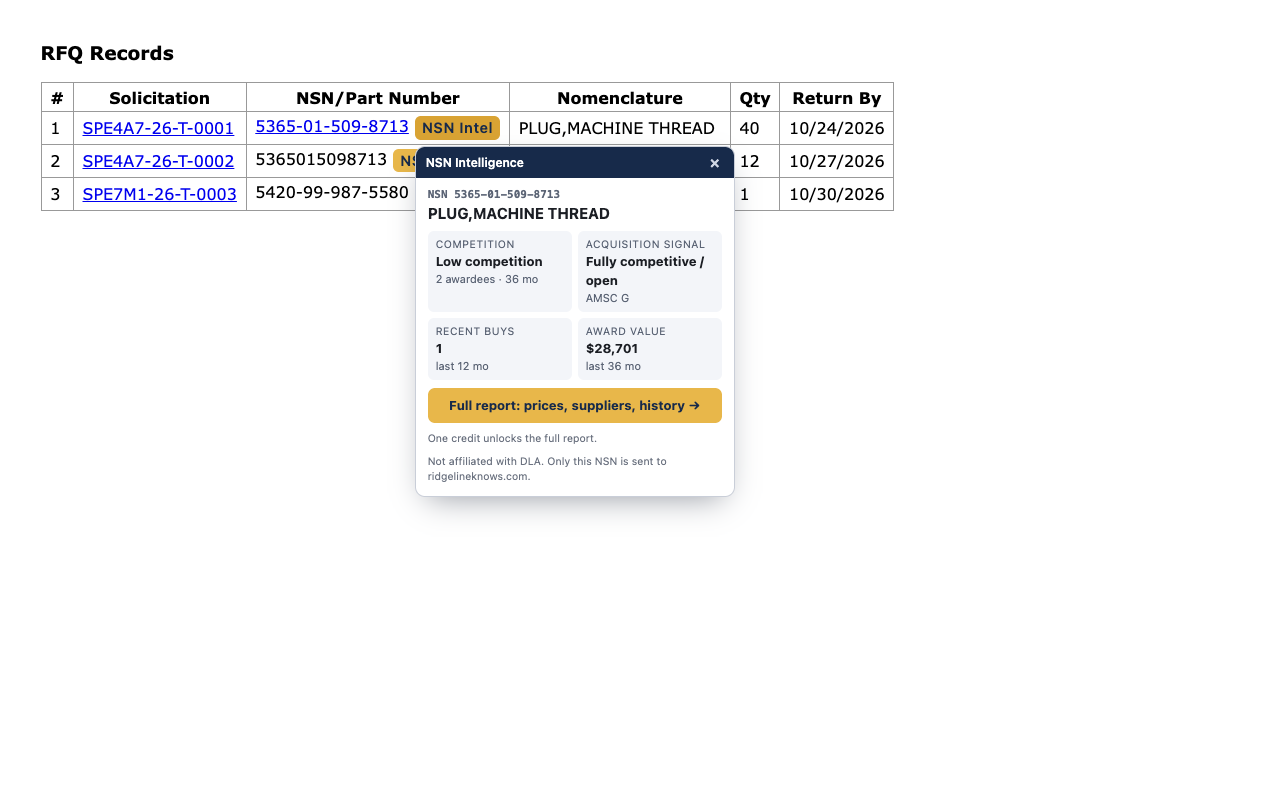
Real data for NSN 5365-01-509-8713, shown on a DIBBS-style test page.
New parts say so plainly
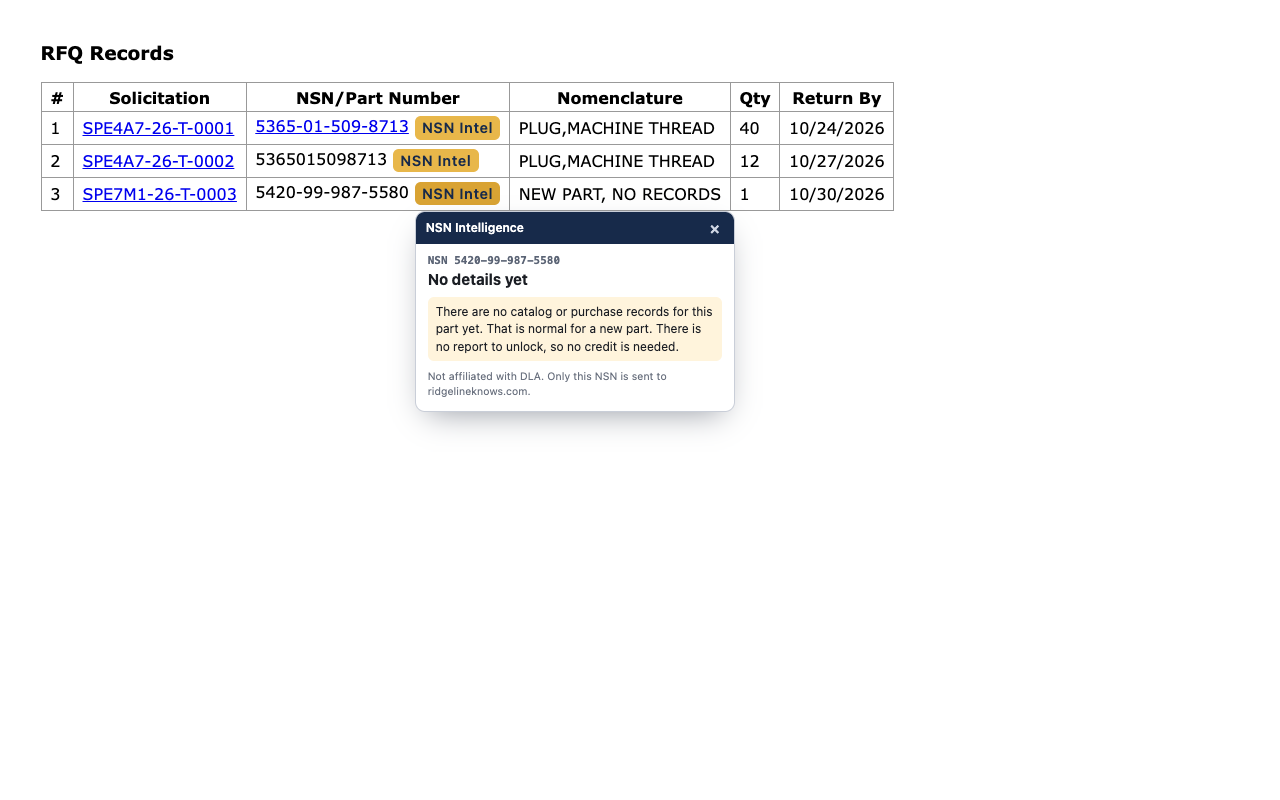
When a part has no catalog or purchase records yet, the panel says “No details yet.” There is no report to unlock, so no credit is asked for.
Not on DIBBS?
Type any NSN into the toolbar popup, or select an NSN on any page, right-click, and choose “Look up in NSN Intelligence.”
FAQ
Does it cost anything?
The extension and the summary are free. The full report on ridgelineknows.com costs one credit. Parts with no records show “No details yet” and never ask for a credit.
Does it touch my DIBBS account?
No. It never logs in to DIBBS, never sees your password, and never sends anything to DIBBS. It only reads the NSNs already on the page so it can place the buttons.
Why do I have to click? Why not show everything at once?
A results page can list 50 or more NSNs. Looking them all up would send parts you never asked about. Nothing leaves your browser until you click, and then only that one NSN.
Some numbers have no button. Why?
Buttons go on hyphenated NSNs (5365-01-509-8713), and on a 13-digit NSN when it fills a whole table cell or link. Contract, PR and phone numbers are skipped on purpose. If a real NSN is missing a button, email me the page and the NSN.
What does “No details yet” mean?
There are no catalog or purchase records for that part yet. That is normal for a new part. There is no report to unlock.
Is this from the Defense Logistics Agency?
No. I built it on my own. It is not affiliated with, or endorsed by, DLA.
Privacy
When you click an NSN Intel button, the extension sends that one National Stock Number to ridgelineknows.com to fetch its summary. It sends nothing else from the page, never contacts DIBBS, and keeps no history. Lookups are cached in your browser for up to an hour and cleared when Chrome closes. Like any web request, the server sees your IP address, which is used only to limit excessive lookups.
What it asks Chrome for, and why:
storage: keeps lookups for one hour in session memory, so repeat clicks don’t ask the server again.contextMenus: adds “Look up in NSN Intelligence” to the right-click menu.www.ridgelineknows.com: the NSN Intelligence service that returns the summary.- DIBBS pages: finds NSNs on the page to place the buttons.
It never sells data, runs no remote code, and is not used for credit decisions. Privacy policy
Change log
0.1.2 coming soon (not in the Chrome Web Store yet)
- First release: a gold NSN Intel button beside every NSN on DIBBS, with a free summary of competition, acquisition signal, recent buys and award value.
- New parts with no records say "No details yet" and never ask for a credit.
- Look up any NSN from the toolbar popup, or select one on any page and right-click.
Support
Something not working, or a question about a part? Email google-extensions@ridgelineknows.com. Include the NSN and, if you can, a screenshot of the DIBBS page.
Not affiliated with, or endorsed by, the Defense Logistics Agency.