Free Chrome extension
Prompt Loader for Suno
Keep your Suno prompts as files on your computer. Prompt Loader opens beside suno.com, lists your songs, and fills the Create form in one click: title, style, exclude styles and lyrics. You check it and press Create yourself.
Who it’s for
- You make lots of songs and keep the prompts as files.
- You edit the lyrics or style often and regenerate a track, and you’re tired of pasting the same four boxes again.
It’s not for everyone. If you make one song at a time and rarely change it, pasting into Suno is simpler. You don’t need this.
How it works
Open the panel and add a folder
Go to suno.com/create in Chrome and click the Prompt Loader icon in the toolbar. The panel opens on the right. Click + Add a song folder and pick the folder that holds your prompt files. Chrome asks once for permission to read it.
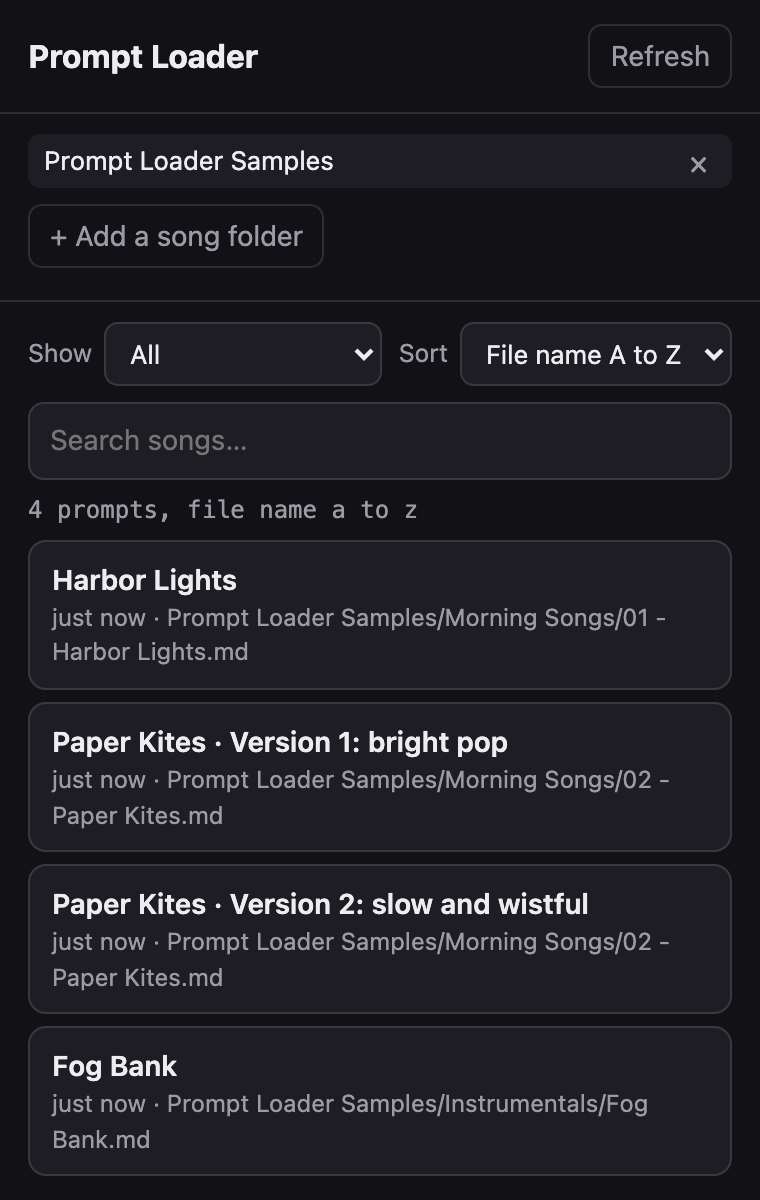
Your songs are listed
Every prompt file in the folder and its subfolders shows up. Search, pick a folder in Show, or change the order in Sort.
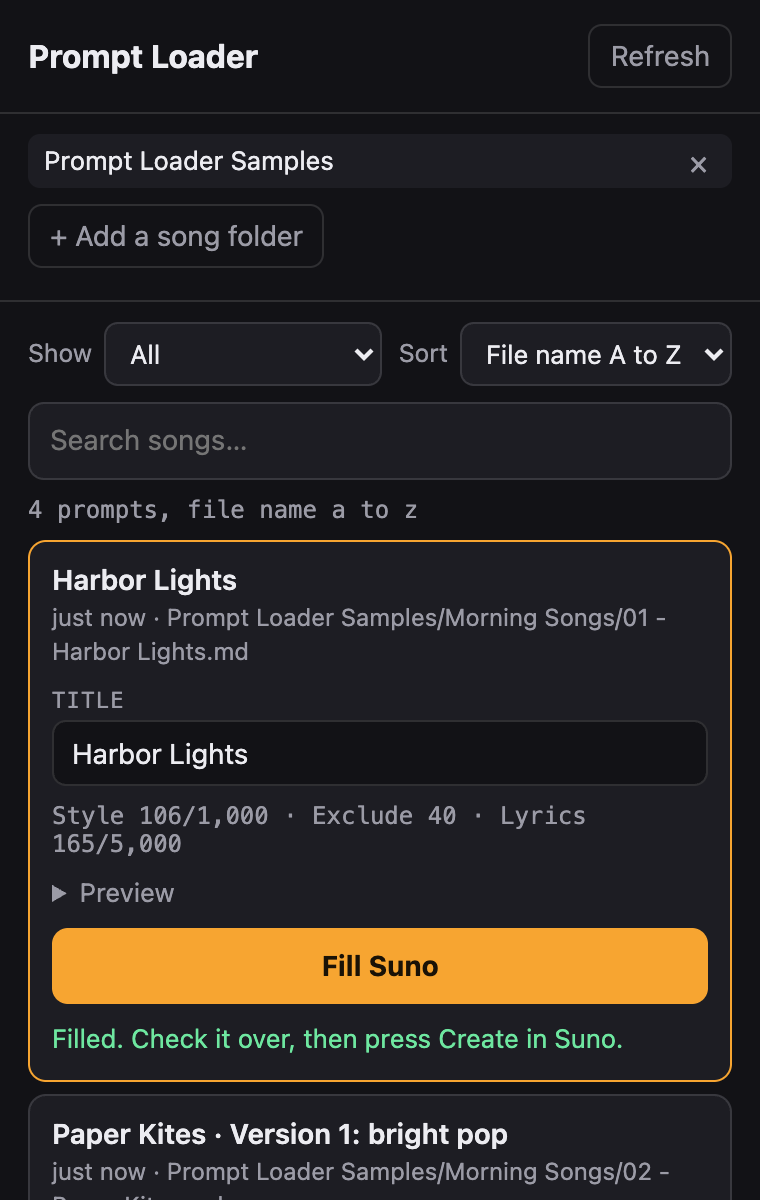
Pick a song and click Fill Suno
Click a song to open it. You can change the title first. The counts tell you if any part is over Suno’s limit. Click Fill Suno.
Check it, then press Create
The title, style, exclude styles and lyrics are filled in. Prompt Loader never presses Create. Look it over and press Create in Suno yourself.
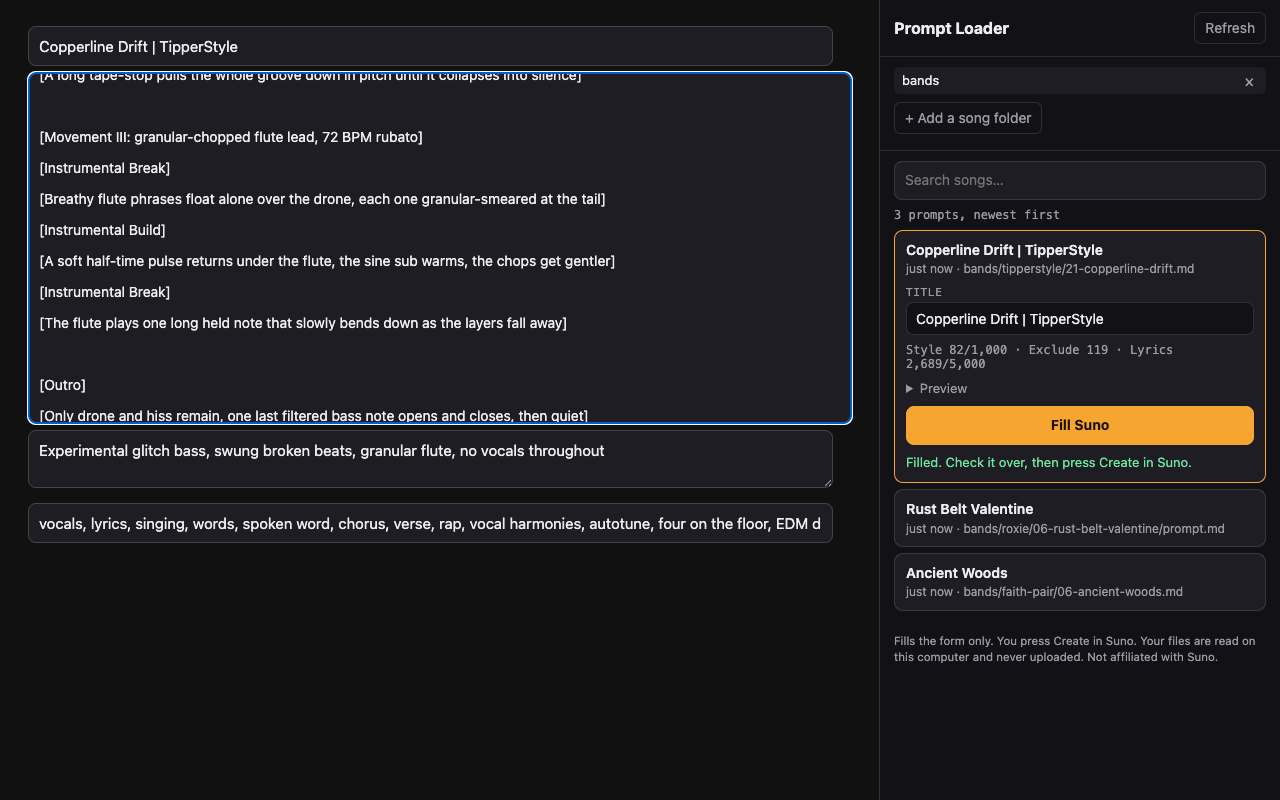
Shown on a test copy of Suno’s form.
Try it in a minute
See it work before you write anything.
- Download the sample songs (.zip)
- Unzip it. You get a folder called Prompt Loader Samples with three short songs.
- Open suno.com/create, open the panel, and add that folder.
- Click Harbor Lights, then Fill Suno.
The samples also show the extras: one file holds two versions of a song, one song is an instrumental, and a folder called _backup is skipped.
The file format
Each song is one text file ending in .md. It looks like this:
# Harbor Lights

## STYLE
warm indie folk, fingerpicked acoustic guitar, soft brushed drums, upright bass, gentle male vocal, 92 BPM

## NEGATIVE PROMPT
heavy distortion, autotune, trap hi-hats

## LYRICS
[Verse 1]
The boats come in when the sky goes gray
Ropes on the dock at the end of the day

[Chorus]
Harbor lights, bring me home
Harbor lights, I won't be gone long- # Title on the first line becomes the song title.
- ## STYLE is required. A file without it is skipped.
- ## NEGATIVE PROMPT (or ## EXCLUDE) fills Exclude styles. Optional.
- ## LYRICS fills the lyrics box. Leave it out for an instrumental, and the lyrics box is cleared.
- Upper or lower case both work. You can wrap a section in
```fences or not. - Repeat the sections under a new heading in the same file to make a second version. It shows as its own entry.
- Suno’s limits: title 80 characters, style and exclude 1,000 each, lyrics 5,000. The panel warns you before filling.
- Files named README.md, CLAUDE.md or CHANGELOG.md are ignored.
Have an AI write them
Paste this into ChatGPT, Claude or any AI, add your idea at the end, and save the answer as a .md file in your song folder.
Write a song for Suno and give it to me as one Markdown file I can save with a .md ending. Use exactly this layout and nothing else:

# (the song title)

## STYLE
(the music style: genre, instruments, voice, tempo, mood; under 1,000 characters)

## NEGATIVE PROMPT
(styles to avoid, comma separated)

## LYRICS
(the lyrics with section tags like [Verse 1] and [Chorus]; under 5,000 characters. Leave this section out for an instrumental.)

My song idea:
Tips
- Show lists every subfolder that holds songs. Pick one to see only that folder. Your choice is remembered.
- Sort is newest first (the file you saved last is on top) or by file name A to Z, so files numbered 01, 02, 03 stay in order.
- Name a folder with a
_in front, like_backup, and Prompt Loader skips it. - Edited a file? Go back to the panel or click Refresh. It reads the files again.
- You can add more than one song folder.
Change log
0.1.3 coming soon (not in the Chrome Web Store yet)
- A Show menu above the search box: pick one subfolder to see only its songs.
- Folders whose names start with _ are skipped, so a backup can sit beside your prompts without showing up.
- A Sort menu: newest first, or by file name A to Z (so 01, 02, 03 stay in order).
- Show and Sort are remembered when you reopen the panel.
- A Help & examples link in the panel goes to this page.
0.1.1 October 18, 2026
- If a folder has no usable prompt files, the panel says why instead of showing an empty list.
0.1.0 October 17, 2026
- First release: a side panel on suno.com that fills the Create form (title, style, exclude styles and lyrics) from your prompt files.
Privacy
Your files are read on your computer and never uploaded. Prompt Loader sends nothing anywhere and collects no data. Privacy policy
Support
Something not filling right, or a question? Email google-extensions@ridgelineknows.com.
Not affiliated with or endorsed by Suno.